.png)
Home Based Learning
Find out how to access Home Based Learning through the SLS portal, and get help with login issues or password resets.
Introduction
In view of the Coronavirus (COVID-19) situation, HBL aims to ensure that learning continues for students during school closure. Students will be completing their online assignments for the respective subjects through the SLS Learning portal: Student Learning Space (SLS) (opens in new tab) (with Google Chrome or Apple Safari).
Technical Issues Support for Student Learning Space (SLS) Portal
For technical issues pertaining to the use of the portals such as resetting passwords or errors during login, please refer to the contact details below:
School-based Helpline
1. Mr Muhammad Hafiz Mohamed Yasim, muhammad_hafiz_mohamed_yasim@moe.edu.sg
2. Miss Woon Ai Ling, woon_ai_ling@moe.edu.sg
Operation Hours: Mondays to Fridays: 8.00am - 4.00pm
Closed on Saturdays, Sundays & Public Holidays
You may contact school helpline at 67634812
SLS Helpdesk
Email: helpdesk@sls.ufinity.com
Operation Hours: Mondays to Fridays: 4.00pm - 9.00pm (School Days)
Saturdays: 9.00am - 3.00pm
Closed on Saturdays, Sundays & Public Holidays
Note: If you are a student, the Helpdesk will need to verify your identity using the security questions that you have set up when your account was first activated.
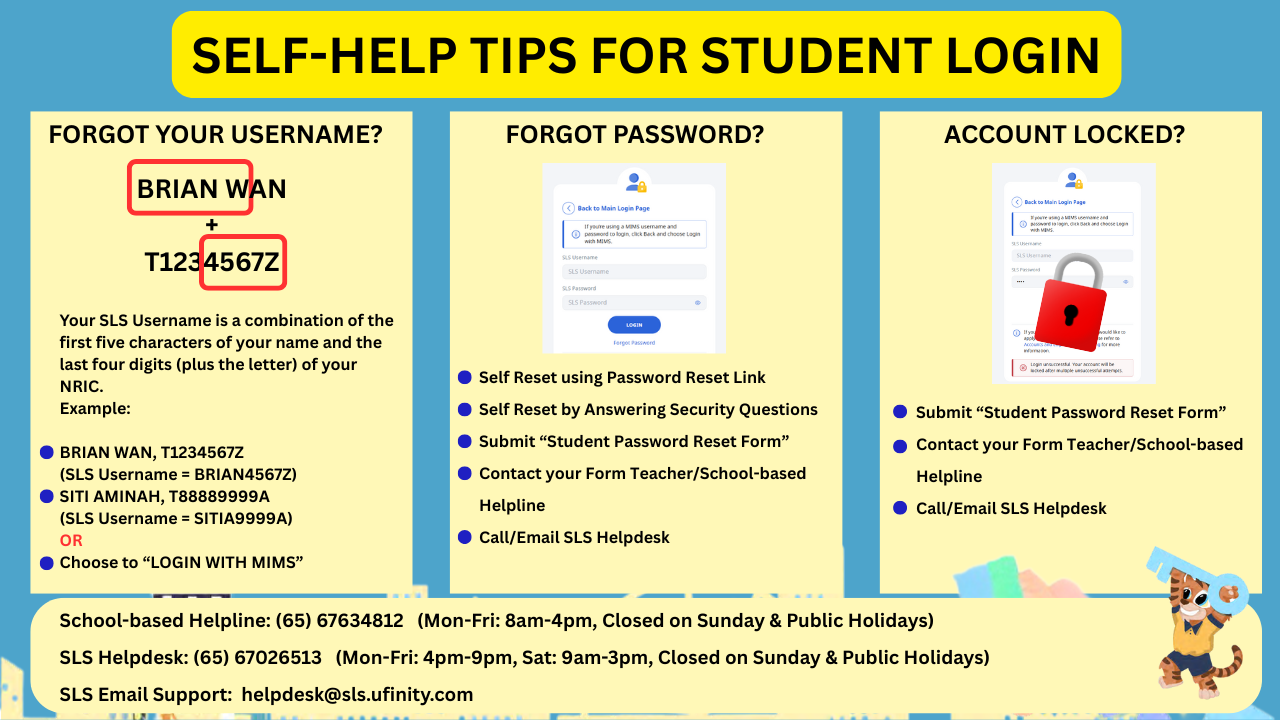
For Password Reset, you may also click on this Student Password Reset Form (opens in new tab)
SLS log-in Troubleshooting Guide: SLS Troubleshooting Guide (opens in new tab)